Try MyPowerTennis early
Be there before everyone else: measure your swing speed, your Stroke Score and your swing analysis right on the Apple Watch – and help make the app better.
Free · leave anytime · open the link on your iPhone
How to join
Install TestFlight
Get Apple's free TestFlight app from the App Store on your iPhone.
Join the beta
Open the invite link above on your iPhone and tap “Install” in TestFlight.
Test & give feedback
Put the Watch on, hit a few strokes, check the analysis – and send us your impressions.
First launch: quick confirmations
On first launch the Watch asks for permissions for the motion measurement (health data / workout). It looks like a lot but takes just a few seconds: simply enable all switches and tap “Continue”. Only your swing motion is measured – no sharing, no ads (privacy).

1 · The prompt starts like this
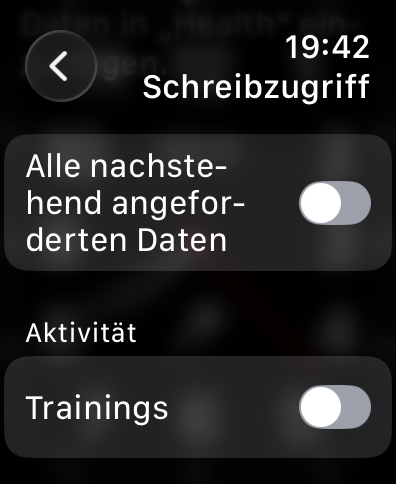
2 · Enable all switches
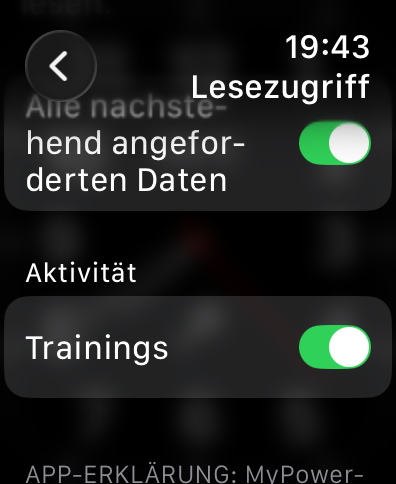
3 · Should look like this → “Continue”
What you need
- A real Apple Watch (Series 6 / SE 2nd gen or later – watchOS 11 required; Series 4/5 and SE 1 are not supported) – the simulator provides no motion data. For 800 Hz impact timing: Series 8+/Ultra.
- An iPhone running iOS 18.2 or later; the app installs on both Watch and iPhone.
- Signed in to iCloud, so history and trends sync across your devices.
What we especially look at
- Live display on the Watch (speed & color bar)
- Are speed, Stroke Score, spin and pronation plausible?
- Is the contact point detected correctly?
- Swing-path graphic, detail view and long-term trends
- Sync between Watch, iPhone and iPad
Send feedback
Best directly in TestFlight (take a screenshot → share) or by email. Please mention the stroke type, your Apple Watch model and the watchOS/iOS version. Crashes and implausible values are welcome with a short description – thank you!
Joining the beta is subject to Apple's TestFlight agreement. How we handle data is described in our privacy policy.